
Episode 08 / Data Quality
Data Freshness
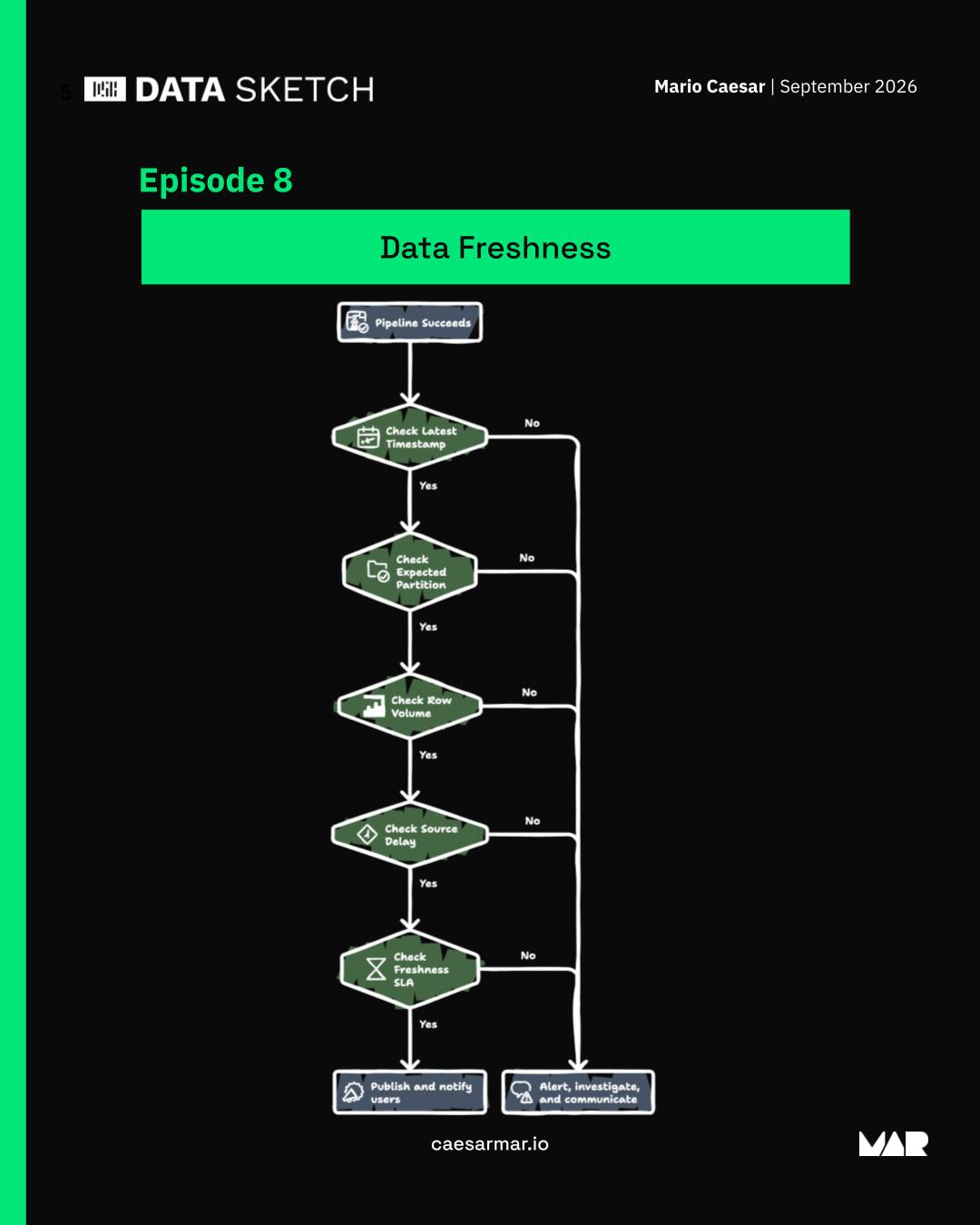
A successful pipeline run can still leave users with stale data. Check the latest timestamp, expected partition, row volume, source delay, and freshness SLA before treating the result as ready.
By Mario Caesar ·
░░░░░░░░▒░░░░░░░░░░░▒▒░░░▒░░░░░░░▒░░░░░░░░░▒░░░░░░░▒░░░░░░░░░░░░░░▒░▒▒░░▒░▒░░░░░▒░░░░░░░░░░░░▒▒░
░░░░░░░░░░░░░▒░░▒░░▒▒▒▒▒▒▒░▒░░▒▒░░░░░░░▒░░░▒░░░░░░░░░░░░░░░░░░▒░▒░▒▒▒▒░░░░░░▒░░░░░▒░░░▒▒░▒▒░░░░░
▒░░░░░░░░░░░░░░░░▒▒▒░░░░░▒░░░░░░░░░░░░░░░░░░░░▒░░▒░░░░▒░░░░░▒░░▒▒▒░░░░▒░░░░░░░░▒░░░░░░░░░░░░░░▒░
░░░▒░▒░░░▒░░░░░▒▒░░░░░░░░░░░▒░░░░▒░░░░▒▒░░░░░▒░▒░░░░░▒░░▒░░░▒░░░░░░░░▒░░░▒░░░░░░░░░░░░░░░░░▒░▒░░
░▒░░▒░░░▒░░░░▒▒▒░░░░░▒░▒▒░░░░░░░░░▒░▒░░░░░░░░░░░▒░░░░▒▒░░░░░▒░▒░░░░░░░░▒░░▒▒░░▒░▒░▒░░░░░░░░░░▒░░
░▒▒░░░▒░░░░▒░▒░▒░▒░▒░▒░▒░░░░░░░░░░░░░░░▒░░▒░░░░░░▒░▒▒▒░░▒░░░░▒░▒░░░░░░░░▒░░░░░░▒░░░▒░░░░░░▒░░░░▒
░▒▒░░░░░░░░░▒░▒░░░░░░░░░▒▒▒▒▒░░▒░░░░░░▒░▒░▒▒░░▒░░░░░░░░░░░░░▒░░░░░░░░░▒░▒▒░░▒░▒░░░░░░░░░░▒▒░░░▒░
░░░▒░░░░░░░▒▒░░▒▒░░▒▒░░░░░░░░░░▒░░░░░░░░░░░░░░░░░░░░░░░░░▒░░░░▒░░░░░░░▒░▒░▒░░░░░▒░░░░▒▒▒▒░░░░░░░
░░▒░▒░▒▒░▒░░░▒░░░▒░▒░░░░░░░░▒░░░▒▒░░░░░░░░░░░░░░░▒░▒░▒░░░▒░░▒░░░░░░░▒░░▒▒░▒░▒░░░░░░▒░░░░░▒░░░░░░
░░░░░░░░▒░░░▒░▒░░░░░░░▒▒░░░▒░░▒░░░▒▒░░░░▒░░▒░░░▒░░░▒░░░▒░░░░░▒▒░░▒░░▒▒░░▒▒░░▒▒░░░░▒░▒░░░░░░░▒▒░░
░░░░▒▒░░░░░░▒░░░░░░░░░░░░░░░░░▒▒░▒░▒░▒░░░░░░░░░░▒▒▒▒▒░░░░░░▒░░░▒░░▒░░░▒░░░░▒▒░░░░░░▒░░░▒░▒░▒░░░▒
░░▒░░▒░░░░▒░░░░░▒░▒░░░▒░░░░░░▒░▒▒░░░░░░░░░░░░▒▒▒░░░░░░▒░▒░░░░░░▒▒░░▒░░░▒░▒▒░░░░░▒▒░▒▒░▒░▒▒░▒░▒░░
░░▒░░▒░░░░░░▒░░░░░░░░▒░░░░░░░░░░░░▒░░░▒▒░░░▒▒▒▒░░░░░▒░░▒▒░░▒░░▒░░░░▒░▒░░░░▒░░░░░░▒▒░░░░░░░░░▒░░▒
░▒░░░░░░░░░░▒▒░░░░░░▒░░░░░░░░░░░░▒▒░░░░░░░░▒░░░░▒░░░░░░░░▒░░░░░▒░░░▒░░░░▒▒░░░░░░▒░░░░░░░░░▒░▒░░░
▒░░▒░░░░░░░░░▒░░░▒░░░░▒░░░▒░░▒▒░▒░░▒▒░▒░░▒░░░░░░░░░░░░░▒░▒░░░░░▒▒░░░░░░░░░░░▒░░░░░░░░░░░░░░░░░░░
░░░▒▒░░░░░░░░░░░░░░▒░░░░░▒░░░░░▒░░▒░▒░░░░░░░░░░░░░▒░░░░░░░░░░░░░░░░░░░░░░░░░░▒░░▒░░░▒░░░░▒░░░░▒░
░░░░▒░░░░░░▒▒░░░░░▒░░░░▒░▒░▒░░░░░░░░░░░░░░░░░░░▒░░░░▒░░░░▒░░░░░▒░░░░░░░▒░▒▒░░░░░░▒░░░░░░░░▒▒░░░░
░░░░░░░▒░░░░░░░░░░▒░░░░░░░░░░░▒░░▒░░░░░░▒▒░▒▒░░░░░░░░▒░▒░░░░▒░░▒▒░░▒▒░▒▒░░░░░░░░░░░░░▒░▒░░░░▒░░░
▒░▒░░░░░▒▒░░░░▒░▒░░▒░▒░░▒░░░░░▒░▒░░░░▒░░░░░░░░▒░░░▒░░▒▒░▒░░░▒░░▒░░▒░░░▒░░░░▒░░▒░░░░▒░░░░▒░░░░░░░
░▒▒░░░░░░░░░░▒░▒░░▒░░░░░░░░░░░▒░░░▒░░░░░░░░▒░░░▒░░░░░░░▒░░░░░░░░░░░▒░▒░▒░░░░▒▒░░░░▒░░░░░░░░░▒▒░░
▒░░▒░░░▒░░▒░░░░░░░░░▒░░░░░░░░▒░▒▒░░░░▒░░░░░░░░░░░░░░░░░▒░░░▒░░░░▒░░▒▒░░░▒░░░░░░▒▒░░░▒▒░░░░▒░░▒▒░
░░░░▒░░░░░░▒░░░▒░░░░▒░░░░░░▒░░░░░░░░▒▒░░░▒░░░░░▒░▒▒░░░░░░░░▒░▒░░░░▒▒░░░░░▒░▒░░░░░░░▒░▒░▒░▒░░░░░░
▒░░░▒░▒░░░▒░░░░▒░▒░▒░░░▒▒░▒▒░░░░░░▒░▒░░░░░░░░░░░▒░░░▒▒░░▒▒░░░░░░░░░▒░░░░░░░░▒░░░░░░░░░░▒░░░░░▒░░
░▒░░░░░░░░░▒░░░░░░▒░░░▒▒░░░░░░░▒░░▒░░░▒░▒▒░░▒▒░▒░░░░░░░░░░░░░░░░▒░░▒░▒░░░░░░░░░░░▒░░░░░░░░░░░░▒░
░▒░░░░░░▒░░░░░░▒░░▒░░░░░░░░░▒░░░░▒░░░░░░░░░▒░░░░░░░▒░░░░░░░░░▒░░▒▒░░░▒░░░░▒░░▒▒░░░▒▒░░░░▒░░░░░░░
░▒▒░▒░▒▒▒░░░▒░░░░▒▒░▒░░░░▒▒▒▒░░▒░▒░░░░░▒░░░░░░░░░░░░░░░▒▒░▒░░░░░▒░▒░░░░░▒░░░░░░░▒░░▒░░▒░░░░▒░░▒░
░░░▒░░░▒░░▒▒▒░░▒░▒░▒░░▒▒▒░░░░░░░░░░▒░▒░▒░░▒░░░░░░░░▒░░▒▒░░░▒░░░░░░░░░░▒░▒░░░▒░░░░░▒░░░░░░░░░▒░░▒
░░░░░░░▒▒░▒░░░░▒░░░░▒░░▒░░░░░▒░░░░▒░░░░▒░░░░░░░░▒░▒░▒░░░░░░░░░░░░░░░░░░▒░▒░░░░░░░░▒░░░░░▒▒░▒░░░░
▒░▒░▒░░░░░▒▒▒░▒░░░▒░░░░░░░░░▒░▒░░░░░░░▒░░▒░░░▒▒▒░░░░▒░▒░░░▒░░▒░░▒░▒░▒░░░▒░░░░░░░░░▒▒▒░▒▒░░▒░░░░▒
░░░░▒░░░░░░░░░▒░░░░░░░░░▒░░▒░░░░░░░░▒░░░░▒░░░░▒░▒░░░░░░▒░░▒░░▒▒▒░░░░░░░░▒▒░░░▒░░░░▒░░░░▒░░░▒░▒▒░
░░▒▒░░▒░░░░░▒░░░░░░▒░▒▒░░▒░░░▒░░░░░░░░░░░░▒░░░░░▒░░░░░░░░░▒░▒░░░░▒░░░▒░░░░▒░░░░░░░▒░░░░▒░░░░░▒░▒
░░▒░░░▒░▒▒░▒░░░░░░░░▒░░░░░░░░░░░░▒░▒▒░▒░▒░░░▒░░░░░░░░░▒░░░░░░▒░░░░░░░▒▒░░▒░░░░░░░░▒░░▒▒░░▒░▒▒░░░
▒░░▒▒░░░░░░▒░░░░░░░░░░░░░░▒░░░░░░░░▒░░░░░░░▒░▒░░▒▒░░░░░▒░░▒░░░░░░░▒░░░░░░░░░░░▒░░░░░▒░░░░▒░░░░░░
░░▒░░░░░▒▒▒░░▒░░░░░▒░▒░░░░░░░▒░░░░░░▒░░▒░░░░▒░░░░░░▒░░░▒░░░░░▒░▒░░▒░░░░░░░░░░░░░▒░▒▒░░░▒░▒░░▒▒▒░
░▒░░░░▒░░░░▒░░░░░░▒░░░░░▒▒░░░░░░░▒░░▒░▒▒░░░░░░░▒░▒░░░░░░░▒▒░░▒░░░░░░▒░░░░░▒▒▒▒░░░░░░░░▒░░░░░▒░░░
░▒░░░░░▒░░░░░░░░░░░░░░░▒░░░░░░░▒░▒░░░░░░░░░▒░░░░▒░░░░▒░░░░▒░▒▒░░░░░▒░░░░░░░░░░░░░▒░░░░░▒░░░░░░░░
░▒░░░░░░░░░░░▒░░▒░▒░░░░▒░░░░░░░░▒░░░░░░░░▒░░░▒░░░▒░░░░▒░░░▒░░░░░░░▒▒░░░▒░░░░░░░░▒░░░░░░░░░░░░░░░
░░░░░░░░░░░▒▒▒░░░▒░▒▒▒░▒░░▒░░░▒░░░▒░░░░▒░░░░▒▒░░░▒░░░░░░░░░░░░░▒░▒▒░░░░░░▒▒▒░░░░░░░░░░░▒▒░▒░░▒░░
░▒░░░░░░░░▒▒░░░░░░░▒▒░░░▒░░▒░░░░░▒░░▒░░░░░░▒░▒░░░░▒░░░▒░░▒▒░▒░░░░░▒░░▒░▒▒░░░░░░░░▒░▒░░░░░░░░░░▒░
░▒░▒▒░░░▒░░░▒░░░░░▒▒▒░▒░░░░░░▒░░░▒░░▒░░░▒▒▒░░▒▒░░░░░░░▒░░▒░░▒░░░▒▒░░░▒░░░░░░░░░▒░░░░▒░▒▒░░░░░▒░░
░░░▒░░░░░░░░░░░░░▒▒░░░░░░░▒░░░░░░░▒░░░░░▒░░▒░▒░░░░░▒▒░░░░░▒░░▒░░░░░░░░▒▒▒░▒░░░▒░░░░░▒▒░░░░░▒▒░░░
░▒░░░░░░░░░░░░░░░░▒░░░░░░▒░░░░░░░░░▒▒▒▒▒░░░░░░░▒░▒░░░░░░░░▒░░░░░░░░░░░░░░░░░░░░░▒░░▒░░▒░░░░░░░▒░
░░░░░░░░░▒░░▒░░░▒░░▒▒▒▒░░▒░░▒░░▒░░░░░░▒▒░░░░░▒░░░░░▒▒░░░▒▒▒░░▒░░▒░░▒░▒░░░░▒░░▒▒░▒░▒▒░░░░░░░░░▒░░
░░░░▒▒▒░▒▒▒░░░░░░▒░░▒▒░░░░░░▒░░░░░░░░▒▒░░▒░░▒▒░▒▒░░░░░░░░░▒░░░░░░▒░░▒░░░░░░░░░░░░░░▒░░░░░░░░░▒░░
░░░▒░░░░░░░▒░░▒░░▒░░░▒▒░░░░░▒░░░░░░░░▒░░░░▒░░▒▒░░▒▒░▒░░░░░░░░░▒░░░░░░░░░░░░░░░░░░░░░░░▒░░▒░░░░░▒
░░░░▒░░░░░░░▒░░░░░░▒▒░░░░▒▒▒░░░░▒░░░░░░▒░░░░▒░░░▒░▒░░░░░░░▒░░░▒░░░░░░░░░░░░░░░░░░░░░░░░░▒░░▒░░░░
░░░░░░▒░░░░▒░░▒░░░░░░░░░░░░░▒▒░░▒░▒▒░░░░░░░▒░▒▒░░░▒░░░▒░░░░▒░░░▒░░░▒░▒░░░░░░░░░░░▒▒░▒░░░▒░░░░░░░
░░░░░░░░▒▒░░░▒░░░░░░░▒░░░░░░░░▒▒░░░░░░▒░░░░░░▒░░░░░░░░░▒░░░▒▒░░░░░░░░▒░▒░░▒░▒░░░░▒░░▒░░░░▒▒░░░▒▒
░▒▒░▒░░░░░░░░░▒░░▒░░░░▒░░░▒░░░▒░░░░░░░░░░░░░░░▒░░░░░▒░░░░░░▒░▒░░░▒▒▒░▒░░░░░░▒░░░░░░░▒░▒░▒░░▒▒░░░
░░░░░░▒░░░░░░▒▒░░▒░░░▒░▒░▒░░░▒▒░░▒░░░░░░░░░░░░░░░▒░▒░▒░░▒░░░░░░▒░░░░░░░░░░▒░░░░░▒▒░░░░░░░▒░░░░░▒
▒▒▒░░░▒░░▒░░▒░▒░▒░▒░░░░▒▒░░▒▒░░░░░░░░░░░░▒░░░░░░░░▒░░░░░░░░░░░░▒▒░░░░▒░░▒░░░░░░░░▒░░░░░░░░░░░░░░
░░░▒░▒░░░▒░░░▒░░░░░░░░░░▒░░░░▒░▒░░░░░▒░░▒░░▒░░░▒░░░░░░░░░░░░░░▒▒░▒▒░▒░░░░░░▒░░░░░░▒░░░░░░░░▒░░░░
░░░░▒▒▒▒░░▒░░░░░▒░░░▒░▒░░░░░▒░░░▒░▒░▒░░░░░░▒░░░░░░░░░░░▒░░▒░▒░▒░░▒░▒░░░▒░░░░▒░░░░░░░░░▒░░░░▒░░░░
▒░▒░░▒░▒░░░░░▒░▒░░░░▒░░░░▒░░▒░░░▒░░░░░░░░░░░░▒▒░░░░░░░▒░▒░░░░░░░▒░░░░░░░░▒▒▒░▒░▒░░▒▒░▒░░░░░░▒░▒░
▒░░░░▒▒░░░░▒░░░░░░▒░░░░░░▒░░░▒░░░░░▒░▒▒░░░▒░░▒▒░░░░░░░▒░▒░░▒░░░░░░░░▒░░░░░▒▒░░░░░░░▒░░▒▒░░▒░▒░░░
░░░░░░░░░░▒░░▒░░░░░░░░░░░░░░░░▒░░▒░░░▒░▒░░░░░░░░░░░░░▒░▒░▒▒░░░▒░░░░▒░░░▒░░░░░░░░░░░░░░▒▒░▒░░░░▒░
░░░░▒▒░░░░░░░▒▒░░░▒░░▒░░░░░▒░░░▒░░░░░░░░░░░░░▒░░▒░░░░▒░░░▒▒░░░░░▒░░▒░▒░░░░░░░░░░▒░▒░░░░▒▒░░░░▒░░
░░░▒░░░▒░░░▒░░░░░░░░░░░░▒░░░░░▒░░░░▒░▒░░░░░░░░░░▒░▒░▒░▒░▒░▒░▒░░▒▒▒░░░░░░░░▒░░░░▒░░░░░░░░▒░░░░░░░
░▒░░▒░░░░░░░▒░░▒░░░░░░░▒░░▒░░▒░░░░░░░░░░░░░▒▒░░░░░░░░░░░░░░░░░▒░░░░░░░░░░▒░░▒░▒▒░▒░░░░░░▒░░░▒░░▒
░░░░░░░░░░░░░░▒▒░░░░░░░░░░░░░▒▒░░░▒░░░░░░░░░░▒░▒░░░░▒░░▒░░░░░░░░░░░░░▒▒░▒░░░░░░░░░▒▒░░░░░░░░░░░▒
░░░░░░░░░░░░░░░▒░▒░░░░░░░░░░▒░▒░░░░░░░░░▒░▒▒░░▒░░░░░▒░▒░░▒░░░░░░░░░▒░░░░░░░▒░▒░░░░░░░▒░▒░░░░░▒░░
░░▒░░░▒░░░▒░▒░░▒░░░▒▒▒░░░▒░░░▒░░░▒░░░░▒░░▒░▒░░░░░░░░░░░░▒░▒░░░░░░░▒░░░▒░░░▒░░░░▒░▒░░░░▒░░░░░░░░░
▒▒░░▒░▒▒▒░░▒░░░░░░░░░░░░░▒░░▒░░░▒░▒░▒░░▒░░░░░▒░░░░░░░░░░░░░░░░░░▒░▒░░░▒░░░░░░▒░▒░░░▒░░░░░░░░░░░░
▒░▒░░░░░▒░░░░░▒░░░░░░░░▒▒▒░░░░▒░░░░▒▒░░░░░░░░░░░░░░░░░░░░░░░░░░░░▒▒░░░▒░░░░░▒░░▒░░▒░▒░░▒▒░▒░▒░░░
Reading the sketch
Check the latest timestamp
Inspect how recent the available data is, even when the pipeline reports success.
Check the expected partition
Confirm that the partition needed for this delivery is present.
Review the row volume
Check the amount of data received for the expected delivery.
Check for source delay
Determine whether the source has delivered the data required for the refresh.
Compare with the freshness SLA
Check whether the data meets the agreed freshness requirement.
Choose the delivery outcome
Publish and notify users when the checks pass. If a check fails, alert, investigate, and communicate the delay.